http://www.macromedia.com/devnet/security/security_zone/mpsb05-07.html?pss=rss_flashplayer_mpsb0507
Thanks for Netdiver for the information. For you guys there which has Flash Player 8. It wouldn't be any harm for you already. This is because the guys out there found that there's possibily unauthorized third party would able to execute malicious code into the target computer that has Flash Player 7 or earlier installed on their computer.
Poor thing.

Free flash tutorials show you how to design flash animation and flash site using Adobe Flash CS6. Visit our site for Adobe Flash tutorials and flash training - for free! Learn flash web site design by studying our adobe flash tutorials which are free and get adobe flash download at our site.
Tuesday, November 15, 2005


Monday, November 07, 2005
Flash MMORPG a dream? Not anymore
http://www.dofus.com
An amazing with great graphics to date and utilizing Flash to enable you to connect to thousands of other gamer out there.
Seriously, i'm amazed, not because the game itself is great, it's good, but because it's using Flash God-Dam-It!
You'll seriously stunned by how those guys from Dofus developed the backend technology for it, try it, no regrets assured. :)
Monday, October 31, 2005
Experiment with random output
Source will be available soon, after some cleanup. lol.
Inspired by http://levitated.net/bones/walkingFaces/index.html
[ Download .SWF ]
Playable on Browser, requires Flash Player 7 or newer
[ Download .EXE ]
Playable on any PC, but bigger file size
Sunday, October 30, 2005
Inspirations
I stumbled across Neave's site, the inspiration section, http://www.neave.com/inspiration which in a way he got inspired by the Flickr's services on how you can experiment with different application using flash, such as
http://www.krazydad.com/colrpickr/
It reminds me back of Guess-The-Google by Mr.Robinson. Hail to them.
http://www.krazydad.com/colrpickr/
It reminds me back of Guess-The-Google by Mr.Robinson. Hail to them.
OpenSource : Magnetic Field V1 (unoptimized)
OpenSource : Magnetic Field V1 (unoptimized)
Author's Note
It's not optimized for this version because it's using the onEnterFrame code which runs all the time even when the user does not do anything, which it will eats up a lot of CPU resources, and in fact, it will also makes your work inefficient for a larger scale basis. V2 coming soon.
Tips : Setting it at a higher FPS will make the thing runs smoother, but with a tradeoff that the script will need to loop more times, if you have more Frames Per Seconds.
30th October 2005
[ Download FLA ]
Friday, October 21, 2005
Easy/Medium : function() in Flash
Author : ManMeng
Difficulty : Easy / Medium
Topic : function() in Flash
It's powerful i mind you, and it's even mightier than Thor or Hercules, well, in my
opinion of course, at least it helped me to get through the website I've completed
recently, and saved my a** on a lot of troubles, (http://www.newmediaaward.com/).
Reading this article, I assume that you would have at least a minor knowledge of what
Flash MX / Flash MX 2004 can do for you, generally.
Introduction
It's so powerful that you can't live without it, and it's so dynamic that you are able to 'call' the function from everywhere within the movie, even if your movieclip are hiding
down deep inside the flash file. And what's even more you can put function inside another
function! And you are not even restricted to do all those super-hyper-special-dynamic-
interaction anymore!
But before i begin anything, i would like to seriously salute, bow and thank to Mr.Chee
Yen from HueVisuaLab that at least enlighten me towards this path to function() in flash.
:D. He's a great mentor to me at least.
The Concept
Okay, you'll even notice that the 'trend' are moving towards from what you hear:
-Script-everything-in-one-frame-flash-file
-ActionScript 2.0
-No-need-write-any-on-release-on-button-anymore
-use-alot-of-movieclip-only
Okay, that must scare you away, well, to be honest, REAL HONEST, it's not that freaking
hard to do it, and you'll be amaze and cry until you dry your tear how easy it is to
master all of those above! I did, and so can you!
The Trick
To show you how it works briefly on this article before i move on to another new post that i'll show how you can utilize this cool function() to create awesome navigation effect without even need you to go through the hassle copy pasting million of times.
So to understand the concept is EXTREMELY IMPORTANT.

First, we only need to have 2 layers for the Flash file (I'll provide the link for download at the end of this lesson). Obviously we'll need one layer that stores the Actionscript & function().
And the layer below is a MovieClip that will act as a button.
You ask why? It's my preference and you'll know why later.

To demonstrate how actually this function() will work, let's start by giving the button a name, i'll name it mc_btn. Then proceed to the actions layer, open up your Actions Panel by pressing on your F9 on your keyboard (PC). We'll use Export Mode if you're in Flash MX (Flash MX2004 by default, we'll have to type the script ourselves,but dont worry, it's not that hard as you think it is!), and it'll be easier for me to demonstrate how this thing work.
The ActionScript
No worries, here's the code you'll need to make it work, if you have trouble understanding it, it's the new Flash Event Model, I'll provide a link for you to read some articles about if you're curious, but even if you have no idea what it is about, you can master it easily, weird eh?
//--------------------------------------------------------------
// the function that you will call when user click on it //
function btnClicked() {
trace("hi")
}
// when user click on this button, instead of writing
// on (press) on a button, you can now do it on the frame
// while still getting the same effect
mc_btn.onPress = function() {
btnClicked()
}
//--------------------------------------------------------------
Save the movie and test it! Note that you can replace the trace("hi") with any other action you want flash to perform, using trace() is just for testing purpose and demonstrate how it works.

[Download FLA]
Have fun!
Salutes,
ManMeng
Friday, October 14, 2005
www.newmediaaward.com
So i've completed the first ever hyper-hardcore-coded interactive Flash website under my hand, but the real pain in my head is, it's ultiamtely CPU intensive that rendered me speechless when it ran on Mac, slow as a rock.
Well, i would still like to share the ups and down throughout the project itself and few discoveries I found and made within the project.
Some basics one, it's best you never user wmode=transparent for good god's sake, you'll end up scratching your head fighting for compability across platform and browser, that is when i realize it is not supported in Mac, and even worse, it increases the lag/cpu hogging. So when i switch back to an opaque background instead for the site, i'm still pondering on how i can stretch the background that is textured to look right on 'designer' point of view instead of splatting a flat colour background on it, it's a real pain, really.
So then i've started to study how it is made posssible that all these interactive sites nowadays, made full use of FSF (Full-Scale-Flash) which stretched the entire flash to 100% width and height, that covers their entire browser and doesnt scale the movie whenever i resize the browser's window instead it only moveis it position and maintain it at center.
That is when something like Stage.align really saved my ass from all the trouble. But as soon i got happy and uploaded the site, i'm bound to another tragedy that the size only loads half on Firefox, i keep on cursing and found out that there's a runaway for it, to add a bit of CSS code on top of your page.
height 100% for your body,html
So that really pissed me off, living thinking when there would be a day that browser war stops. But it's not the end yet, after spending restless month developing the site and figuring out this and that, I've chosed to use only 100% for the width of the class while maintaining the original height of the Flash without stretching it to 100%, because it doesn't fit correctly/entirely inside a 1024x768 screen resolution and would crop my project into half. God.
But alas, it's online and up at http://www.newmediaaward.com. The only pain left to me is to reduce the cpu processing cycles within the site, because even on idle, the movieclip's onClipEvent are everywhere and hogging up all the processing power.
Experiments in FlashMX 2004
Some testing on scrollbar, customly scripted by me. Supporting the mousewheel button, experimental design inspired by guys from http://www.oniondesign.com.tw
Flash Experiment // Magnetic // Runaway
Flash Clock :)
Sunday, August 07, 2005
Basic - The Basics in Flash Part II
Here is again another part of the basics in Flash, covering more topics in how to publish/export your Flash movie files.
Difficulty : Basic / Easy
Topic : Publish Settings in Flash MX 2004
Once you've save your file, you can start to fiddle around with publish setting by going to File --> Publish Settings or by clicking on the Properties panel's publish settings.
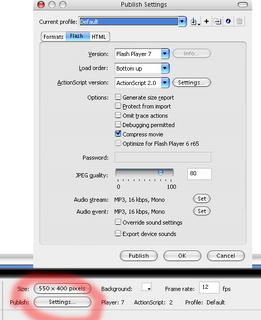
By default, there are both 2 options to choose from, both Flash and HTML format.
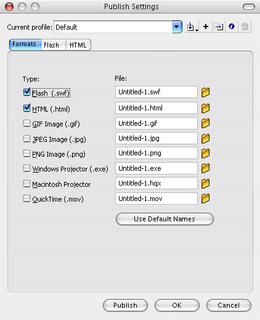
Look closely at the options, you'll see there are options for Projectors as well. It is actually a file that will make your SWF files to be able to run on their computer even if the user doesn't have Macromedia Flash Player or any browser installed. But Windows Projector will only work on Windows operation system while the Macintosh Projector only work on Mac OS's computer.
Projector files helps designer or developer to make their Flash contents into CD-ROMs or even helps compabitlity across different platform with different settings.
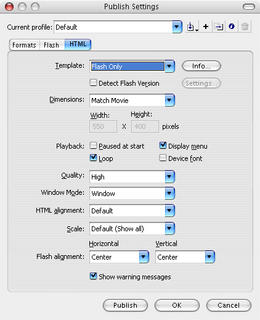
Note : Every options changed here will NOT affect the way your Flash movie will react/behave/interact but merely changes the codes within the HTML page that will render your Flash movie, example, transparent Flash Movie files, etc
As with the HTML settings, the options are pretty explainatory by itself,
Template : What platform your Flash movie will be used on? A computer or PalmOS?
Dimensions : Define the size of your Flash movie will look like
Playback :Define if you want user to control the movie by right clicking for Play/Rewind/Forward options
Quality :The default quality you want the Flash movie to run, From Low to Best, recommended High (default)
Window Mode :You should experiment around with this option, as for the transparent windowless, i've tried it only to work on Windows, while on Mac's IE, it doesn't seem to render properly, and the background of the FLash will still be in opaque colour.
HTML alignment :Which location you want the Flash movie to be located on the HTML page?
Scale :Define if you want the user able to enlarge(zoom) into your movie files, but default setting is recommended
Flash alignment :similar to HTML alignment, you will have to experiment to get the effect you want.
Show Warning Message : Alert messages when your Flash movie has broken script that might make user's computer freeze,it is recommended to turn it on to inform your user in case it asks if they want to stop the Flash movie file from playing.
Publish : Publish!(export)
That should be a brief introductory towards the settings that you will need for exporting your Flash files to SWF/EXE/HQX files. Coming up i'll feature a preloader instead which will be more useful and functional/practical.
Difficulty : Basic / Easy
Topic : Publish Settings in Flash MX 2004
Once you've save your file, you can start to fiddle around with publish setting by going to File --> Publish Settings or by clicking on the Properties panel's publish settings.

By default, there are both 2 options to choose from, both Flash and HTML format.

Look closely at the options, you'll see there are options for Projectors as well. It is actually a file that will make your SWF files to be able to run on their computer even if the user doesn't have Macromedia Flash Player or any browser installed. But Windows Projector will only work on Windows operation system while the Macintosh Projector only work on Mac OS's computer.
Projector files helps designer or developer to make their Flash contents into CD-ROMs or even helps compabitlity across different platform with different settings.

Note : Every options changed here will NOT affect the way your Flash movie will react/behave/interact but merely changes the codes within the HTML page that will render your Flash movie, example, transparent Flash Movie files, etc
As with the HTML settings, the options are pretty explainatory by itself,
Template : What platform your Flash movie will be used on? A computer or PalmOS?
Dimensions : Define the size of your Flash movie will look like
Playback :Define if you want user to control the movie by right clicking for Play/Rewind/Forward options
Quality :The default quality you want the Flash movie to run, From Low to Best, recommended High (default)
Window Mode :You should experiment around with this option, as for the transparent windowless, i've tried it only to work on Windows, while on Mac's IE, it doesn't seem to render properly, and the background of the FLash will still be in opaque colour.
HTML alignment :Which location you want the Flash movie to be located on the HTML page?
Scale :Define if you want the user able to enlarge(zoom) into your movie files, but default setting is recommended
Flash alignment :similar to HTML alignment, you will have to experiment to get the effect you want.
Show Warning Message : Alert messages when your Flash movie has broken script that might make user's computer freeze,it is recommended to turn it on to inform your user in case it asks if they want to stop the Flash movie file from playing.
Publish : Publish!(export)
That should be a brief introductory towards the settings that you will need for exporting your Flash files to SWF/EXE/HQX files. Coming up i'll feature a preloader instead which will be more useful and functional/practical.
Friday, August 05, 2005
Basic - The Basics in Flash
Although i'm supposed people that browses into this blog would have a minimum level of understanding on how Flash works, i assume. But i'll start with something light before i move on to something more advance, involving typing out custom scripts and so on.
The Basics
Just like any other software, your Notepad/SimpleText(Mac), you have to go to File -> New before you can start to do anything inside the software, the tools are standard where you can use some of the tool to draw, resize, delete, arrange your objects and so on.
Like mine, i have my Action-Frame panel opened, which is then used to write simple ActionScript. But you'll only have to understand how the Properties panel at the bottom of your screen work at the start. Because it will help you a lot in making things easy for you.


Upon opening new document, please observe the Properties panel at the bottom of your screen. There are some settings that you'll have to observe and understand what every each of it does and affect your Flash movie. It is not crucial to understand every single of it but it's useful if you do.

If you notice, there are few fields that you can adjust on the spot, such as Frame rate/Fps and with other miscellanous information about your Flash movie file. Click on the Size : 550 x 400 to check with what setting you can adjust for your new Flash movie file.

Dimensions : Setting a value for this will define the space that your movie will be, the default value would be 550px * 400px.
Background colour: Define what background colour that you want your movie to be
Frame rate : By default 12fps (Frame per second) would be sufficient for a normal animation / navigation menu bar, but if you're working towards a complex and smooth movie/animation, you might think to adjust it to a slightly bigger value, but do beware and keep in mind, even if you set your movie frame rate to 60fps, but not every single computer are able to process so many frames per second as smooth as other computer, especially with older generation of computers, Flash movie files tend to run slower than usual because the CPU couldn't process so many objects or frame at one time, making the entire movie/browser slowdown or sometimes crash. The optimum and most used around are 30 - 60fps. Unlike movies, which are either 25fps/29.97 (PAL/NTSC format) Flash movies behaves differently although there are similiarity.
If you notice below the Size setting, there are also another Publish : Settings. I'll cover more on that on the next post, as it has something to do with Exporting your Flash files into HTML and some settings to optimize your Flash movie to run faster/smoother.
There won't be any FLA file for this tutorial as it's just an introductory towards the Macromedia Flash MX 2004 interface.
Have fun.
ManMeng
Why Flash MX 2004?
I'll start this site with some basic introductory on why Flash MX 2004, and reasons of not to avoid it, or scared by it.
There are few good ones, besides from you have to type the ActionScript by yourself, which i know most of us hate to do that, with all those memorizing of alphabets in our mind.
But before this, i was like this as well, i bear the fear to approach or to use this software at all, until i started to work after i graduated, and I got in touch upclose with this software, which since last time, i worked with Flash 4, 5, MX, which i've got myself used to the predefined script inside, and rely a lot on it to make my movie work, take for an example, the simple stop(), which I'll even open up the ActionScript editor and double click on the predefined stop(). It's not to be ashamed of, indeed everyone learn from the basic, and i did. And i would say, the experience to be able to type out the ActionScript out by your hand, the satisfaction is something which is really rewarding, looking back yourself which don't know anything at all about Flash, except animating objects inside.
There are sure lots of people, especially designer turned back against Flash MX 2004 due to it's being focussed more into OOP already, but until now, although i'm a designer, but i realized Flash MX 2004 itself are more versatile then what i used to work with the older version of Flash. The .as files and so much more thing, i mean, it amazed me on how Flash can be expanded, from a single user interface application to multiplayer application, imagine, Massively Multiplayer Online Game (MMOG) on Flash!
I'm looking forward to share lots of my knowledge with you pals,
Salutes,
ManMeng
myFlashPortal!!!
Regards,
Here now you'll find absolutely no bs except when i post site news, and it will be an ongoing post of tutorials, from basics to advance and expert scripting in Flash MX 2004 (I will still feature few Flash MX files, but rarely), this is due because i'm intensively working on Flash MX 2004 recently in the past few month.
And that got me really going with it, for your information, I'll separate the tutorials into 3 category from
1. Basic (Menus/Basic animation/Tips)
2. Advance (Requires understanding of basic actionscript, such as gotoAndPlay)
3. Expert (This would require you to understand complex scripting which you might need to understand how variables in Flash works)
4. Experimental (Things that you find it has no value, but it has it's fun factor in it, basically some of my personal development or experimentation on certain combination of ActionScript)
There won't be a category separator since blogger doesn't include it, so you'll have to search within the posts if you want to look back at past tutorials, but it wouldn't be much problem, email me if you want to request for a help or tutorial, i'll be gladly to help you out, at the moment of course lol.
But no worries, i'll ensure that you'll love Flash like i would, and i really grateful and thankful to those who supported me and urged me to get my head into Flash, especially I've even shocked to know myself that i'm able to learn Flash MX 2004, with me typing out my codes. lol.
I'll do a lot of talking later. I'll start to write tutorial from today on. Why myFlashPortal you ask? I'll answer that later. For now have fun!
Salutes,
ManMeng
Subscribe to:
Posts (Atom)